
Yes: your agent can create an appointment in a calendar app on a Mobilebox phone, date and time pickers included, and check that it saved. On November 22, 2026 our agent put “Dentist, Main Street 12, Thursday November 26, 10:00 to 10:30” into Fossify Calendar and read it back from the day view, after 13 act calls, 89 billed seconds and $0.015.
Pickers are where agents stumble: a clock face and a month grid instead of a text box. Fossify Calendar labels every day and every number on its clock for accessibility, so the agent never needed coordinates. How to connect your agent and write the prompt is on the recipes hub.
The run, call by call
create_phone returned a ready cloud Android 14 phone in 18.1 s; install_app put the 8 MB Fossify Calendar 1.12.2 from F-Droid on it in 1.6 s. The calendar needs no account: new events go to its “Local calendar”, stored on the phone and never synced.
1  [open_app org.fossify.calendar, wait 2500]     → ok, November month grid, "New Event" button
2  [tap desc "New Event", wait 1500]              → ok, a menu opens: "Event" or "Task"
3  [tap "Event", wait 1500]                       → ok, New Event form, Title focused, Nov 22 05:00 AM
4  [type "Dentist", tap "Location", type "Main Street 12", tap "November 22 (Sun)" nth 1, wait 1000]
                                                  → ok, a date picker: each day a button "26" desc="26 November 2026"
5  [tap desc "26 November 2026", tap "OK", wait 800, tap "05:00 AM" nth 1, wait 1000]
                                                  → ok, a clock: Text "10" desc="10 o'clock"
6  [tap desc "10 o'clock", wait 600, tap "OK", wait 800]
                                                  → ok, start 10:00 AM; the end moved to 10:00 AM too
7  [tap "10:00 AM" nth 2, wait 800, tap desc "10 o'clock", wait 600]
                                                  → ok, but the dial stays on hours: 10 was already picked
8  [tap desc "0 minutes", wait 600, tap desc "30 minutes", wait 600]
                                                  → ok, Button "30" desc="30 minutes" [checked]
9  [tap "OK", wait 800]                           → ok, November 26 10:00 AM to November 26 10:30 AM
10 [tap desc "Save", wait 1500, tap desc "26 November"]
                                                  → saved; then element_not_found: a "Disclaimer" dialog
                                                    about reminders covered the calendar
11 [tap "OK", wait 1500]                          → ok, Android: "Allow Calendar to send you notifications?"
12 [tap "ALLOW", wait 1500]                       → ok, toast "Time remaining: 4 days, 4 hours, 54 minutes…"
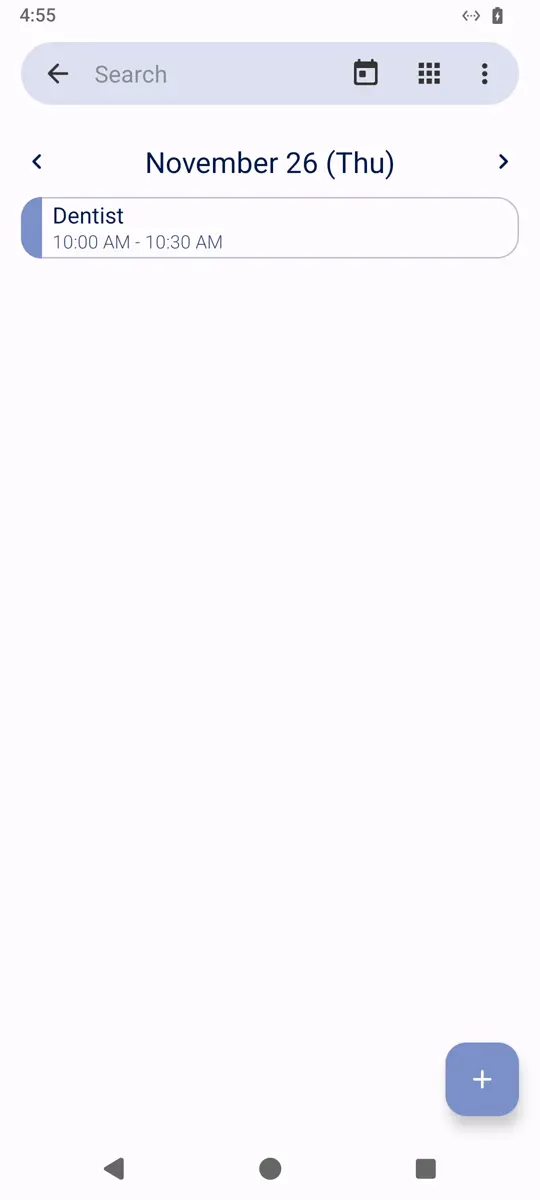
13 [tap desc "26 November", wait 1500]            → ok, day view: Row "Dentist" — 10:00 AM - 10:30 AM
The proof is the last line: the saved event as the app lists it, not the form the agent filled in.
Screenshots
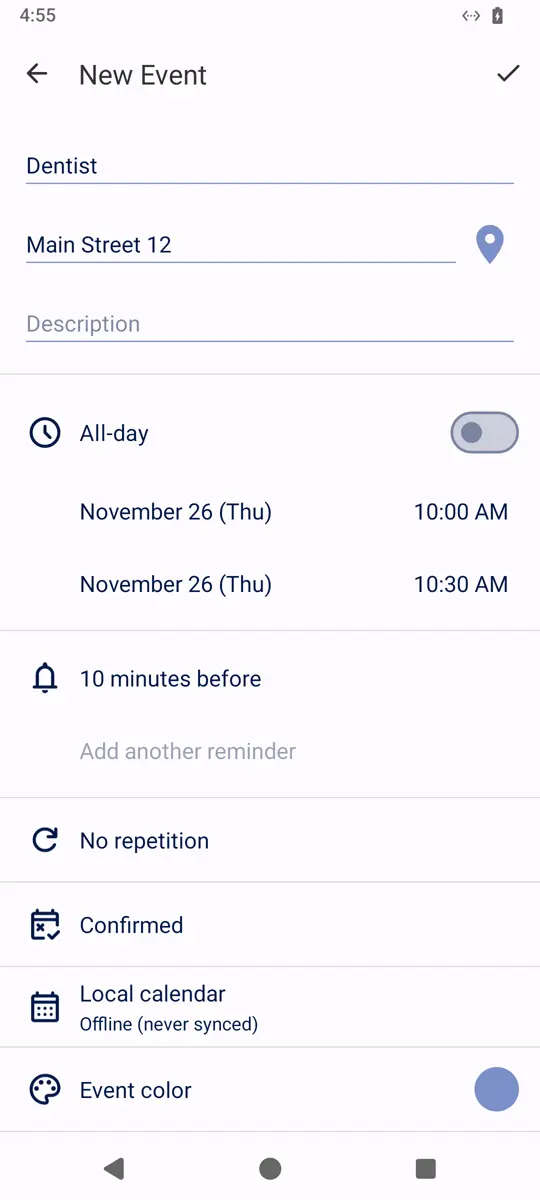
- Fossify Calendar’s New Event form before saving: title Dentist, location Main Street 12, November 26 (Thu) from 10:00 AM to 10:30 AM, a reminder 10 minutes before, Local calendar
- The day view for November 26 (Thu) after saving, with one event: Dentist, 10:00 AM - 10:30 AM
What failed or surprised us
- The month grid draws its events. After saving, the November grid had no “Dentist” on the element list: events are painted into each day cell. Tapping the day opened a list view where the event was a row with its time. When an app draws, look for the view that lists.
- Picking the hour twice does nothing. On the end time the hour was already 10, so tapping 10 didn’t move the clock on to minutes. Tapping the minutes field at the top (
desc "0 minutes") did. The element list’s[checked]and[selected]marks showed which part was active. - Two dialogs after the first save. A reminder disclaimer, then Android’s notification permission. Neither was there before Save, so a batch that expected the calendar failed on the next tap and returned the dialog instead. Answering permission dialogs is covered in Android permission dialogs.
- Whose 10:00? We set no timezone, and the form’s default start was 05:00 AM at 04:54 UTC: the phone ran on UTC. Pass your
countryorcitytocreate_phoneso the time your agent types is your local time; timezone, locale, GPS and IP explains the four settings.
Time and cost
1 min 47 s from create_phone to delete_phone, 89 billed seconds at $0.01 a minute: $0.015. The 13 act calls took 42 s together.
Your own calendar
This phone’s calendar was empty and local, so deleting the phone deleted the appointment. For an appointment that lands in the calendar you use, the app needs your account: a calendar synced over CalDAV (Fossify Calendar reads calendars that a sync app such as DAVx⁵ provides), signed in by you in the live view, on a phone you park instead of delete. Check your calendar provider’s terms before an agent writes to it.
License
Fossify Calendar is open source under the GNU GPL v3 and built by F-Droid (F-Droid page). Etar, the other open-source calendar on F-Droid, is GPL v3 as well; we didn’t run it.
Copy-paste prompt
Use Mobilebox. Create a phone named calendar with city Berlin. Install Fossify Calendar from https://f-droid.org/repo/org.fossify.calendar_25.apk and open it. Create an event "Dentist" at "Main Street 12" on November 26, 2026 from 10:00 to 10:30 in the local calendar: use the date and time pickers, and on the clock tap the minutes field before picking 30. Save it, accept any dialog, then open November 26 and tell me the event line you see. Take one screenshot of that day, then delete the phone, even if a step fails.