
Yes: on a Mobilebox phone your agent can open a web form in Firefox for Android, fill in every field and submit it. On November 22, 2026 our agent filled in the sample order form at httpbin.org in Fennec, the F-Droid build of Firefox, and the server echoed back all seven fields as sent, after 10 act calls, 86 billed seconds and $0.014.
A mobile browser is the widest door an agent has: any site without an app is a site in Firefox. We used httpbin’s test form, a page built to receive test submissions, so nothing real was ordered. Fennec is open source under the Mozilla Public License 2.0, so automating it is yours to do; the sites you open keep their own terms. The connection, the prompt pattern and the other tested apps are on the recipes hub.
The run, call by call
create_phone gave a ready cloud Android 14 phone in 18.4 s. install_app fetched the 130 MB arm64 build of Fennec from F-Droid in 7.2 s:
install_app  url: https://f-droid.org/repo/org.mozilla.fennec_fdroid_1600020.apk
→ Installed org.mozilla.fennec_fdroid 160.0.0 (versionCode 1600020).
The act calls, as sent, with what came back:
1  [open_app org.mozilla.fennec_fdroid, wait 4000]     → ok, "Welcome to Fennec" with Continue
2  [tap "Continue", wait 1500]                          → ok, Android asks: set Fennec as default browser?
3  [tap "CANCEL", wait 1500]                            → ok, Fennec asks the same again
4  [tap "Not now", wait 1500]                           → ok, the start page
5  [tap desc "Search", type "https://httpbin.org/forms/post" submit, wait_for "Customer name"]
                                                        → ok, the form: 54 elements
6  [type ref 6 "Ada Lovelace", type ref 9 "555-0100", …] → 1 ok, 2 stale_ref: the page zoomed in on the
                                                          focused field and every ref below it moved
7  [tap "Telephone:", type "555-0100", tap "E-mail address:", type "ada@example.com",
    key back, wait 800, tap "Medium", …]                → 6 ok, then element_not_found: back left the page
8  [tap "https://httpbin.org/forms/post", wait_for "Customer name"]
                                                        → ok, the tab is back, all three fields still filled
9  [tap "Medium", scroll_to "Mushroom", tap "Mushroom", scroll_to "Delivery instructions:",
    tap "Delivery instructions:", type "Ring twice"]    → ok: Radio "Medium" [checked], Checkbox "Mushroom" [checked]
10 [tap "Submit order", wait_for "custname"]            → ok, httpbin.org/post
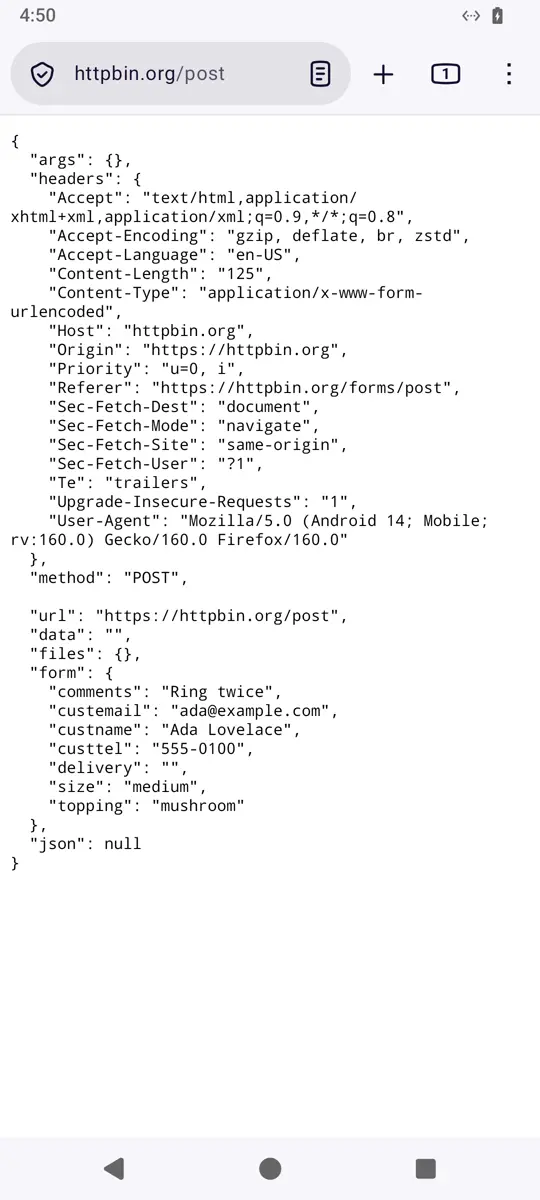
The last screen held the server’s answer as text, so the agent could check it field by field instead of trusting its taps:
"form": {
  "comments": "Ring twice",
  "custemail": "ada@example.com",
  "custname": "Ada Lovelace",
  "custtel": "555-0100",
  "delivery": "",
  "size": "medium",
  "topping": "mushroom"
}
Screenshots
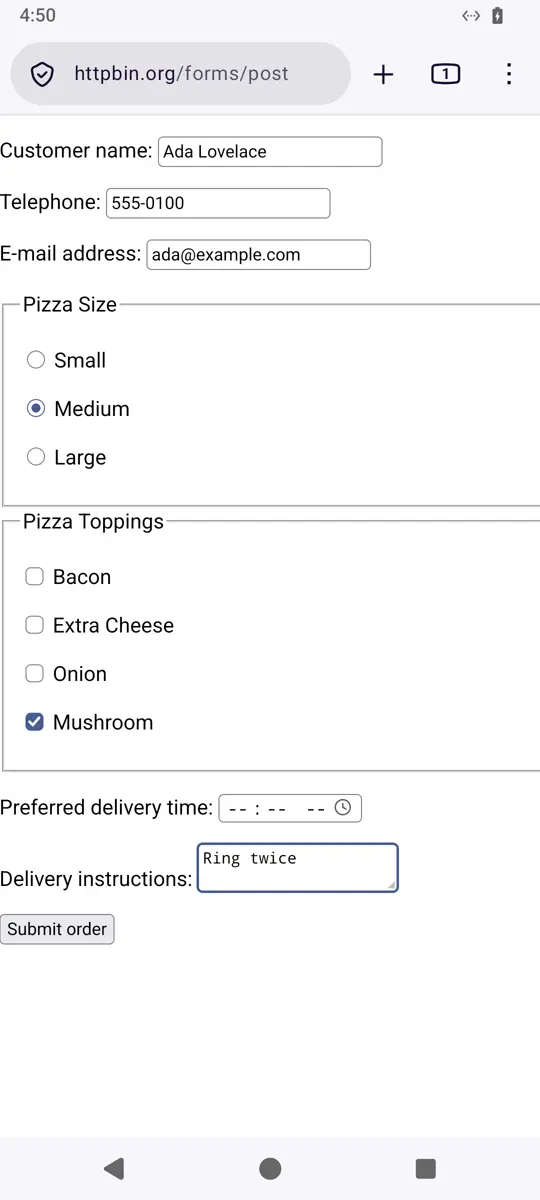
- The httpbin order form in Fennec before submitting: Customer name Ada Lovelace, Telephone 555-0100, E-mail ada@example.com, Medium selected, Mushroom ticked, Delivery instructions “Ring twice”
- httpbin.org/post in Fennec after Submit order: the JSON echo, its form block listing the same seven values
What failed or surprised us
- Web form fields have no names on the element list. Each input showed as a bare
TextField; its label was a separate element next to it. Tapping the label text (“Telephone:”) focused the right field every time, the way a label works in HTML. That’s the target to use for a web form. - Refs shift when the page zooms. Firefox zoomed in on the first field we typed into, so the refs from the screen before were stale one action later. One batch per screen change, or text targets, avoid it; why your agent tapped the wrong thing has the general rule.
- Back is not “hide the keyboard”. We sent
key backto close the keyboard, but none was open, so Firefox went back to its start page. Nothing was lost: the tab came back with the typed values. On a form you can’t refill, don’t send back mid-form. - Two default-browser prompts. A fresh Fennec asks twice, once through Android and once in its own screen. Both have a plain “no” button.
- The time field stayed empty. We left “Preferred delivery time” out: it’s a native time picker, and the form doesn’t require it.
Time and cost
From create_phone to delete_phone: 1 min 46 s on the clock, 86 billed seconds at $0.01 a minute, $0.014. The ten act calls took 34 s of it; the rest was the agent reading screens and deciding.
License
Fennec F-Droid is Firefox for Android built from source by F-Droid, under the Mozilla Public License 2.0 (F-Droid page). httpbin is an open-source HTTP test service under the ISC license; its /forms/post page exists to be submitted. A real site’s form is a different matter: read its terms first, as the hub explains.
Copy-paste prompt
Use Mobilebox. Create a phone named web-form. Install Firefox (Fennec) from https://f-droid.org/repo/org.mozilla.fennec_fdroid_1600020.apk and open it; decline the default-browser prompts. Go to https://httpbin.org/forms/post. Fill in Customer name "Ada Lovelace", Telephone "555-0100", E-mail "ada@example.com", size Medium, topping Mushroom and Delivery instructions "Ring twice": tap each field's label to focus it, and don't press back while the form is open. Take a screenshot, then press Submit order and tell me the "form" values the page shows. Delete the phone at the end, even if a step fails.The Fennec URL is for arm64 phones, which every Mobilebox phone is. When F-Droid publishes a newer build, take the arm64-v8a file from the F-Droid page.