
Yes: Mobilebox, which runs cloud Android phones for AI agents at $0.01 a minute, gives your agent an Android tablet when it creates a phone with "model": "tablet", a 1600×2560 screen at 320 dpi with a smallest width of 800 dp, so apps load their tablet layouts. A tablet costs the same as a phone, and a running phone switches to a tablet and back with one call, keeping its apps and data.
Why a scaled-up phone is not a tablet
Android apps pick their layouts by the screen’s smallest width in density-independent pixels: resources in sw600dp are for 7-inch tablets and up, sw720dp for 10-inch ones (Android: support different screen sizes, window size classes). A phone is around 411 dp wide, so on a phone those layouts never load, however large you make the screenshot. Bugs that live only on tablets stay hidden: a two-pane screen that loses its second pane, toolbar actions that move out of the overflow menu, a dialog sized for a phone, content under the tablet taskbar.
The same app on both
We installed AnkiDroid 2.25.3 from F-Droid on a production tablet and a production phone on November 23, 2026, and took both through the same steps over the REST API: Get started, allow file access, back.
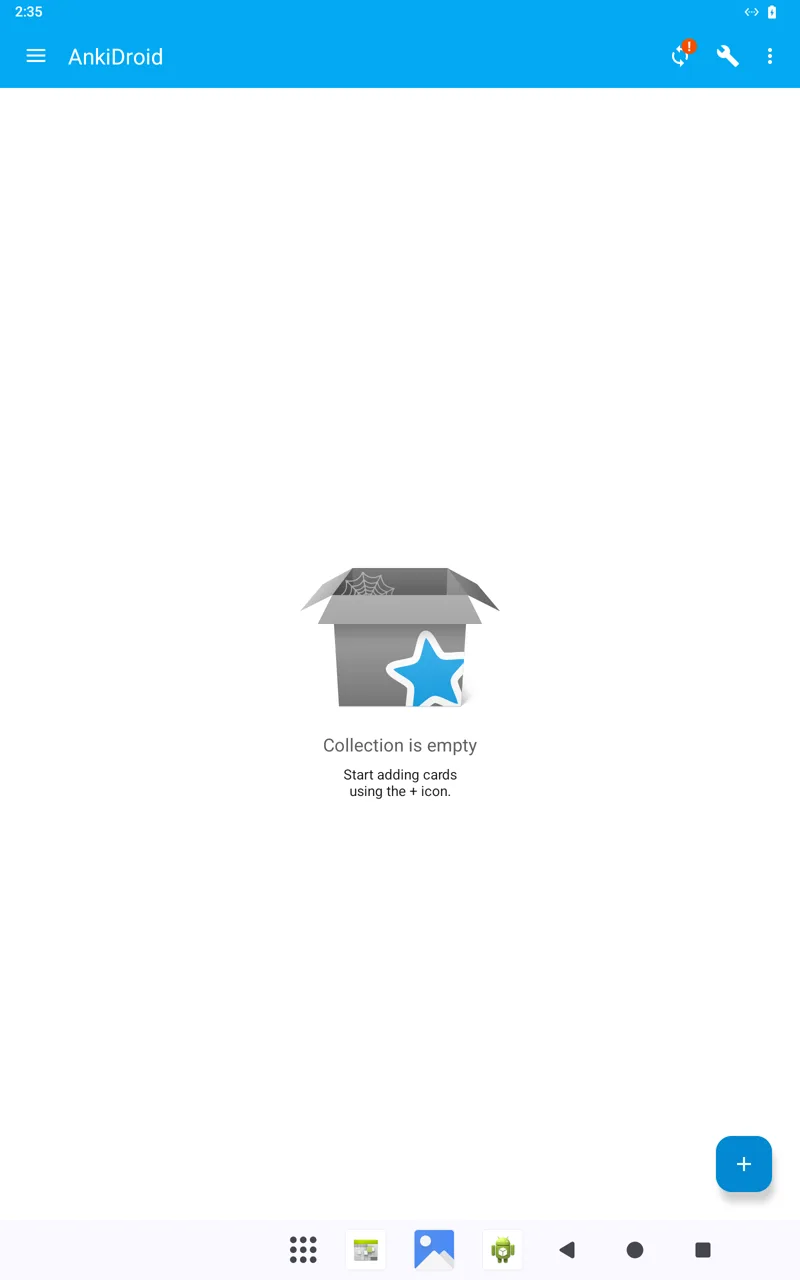
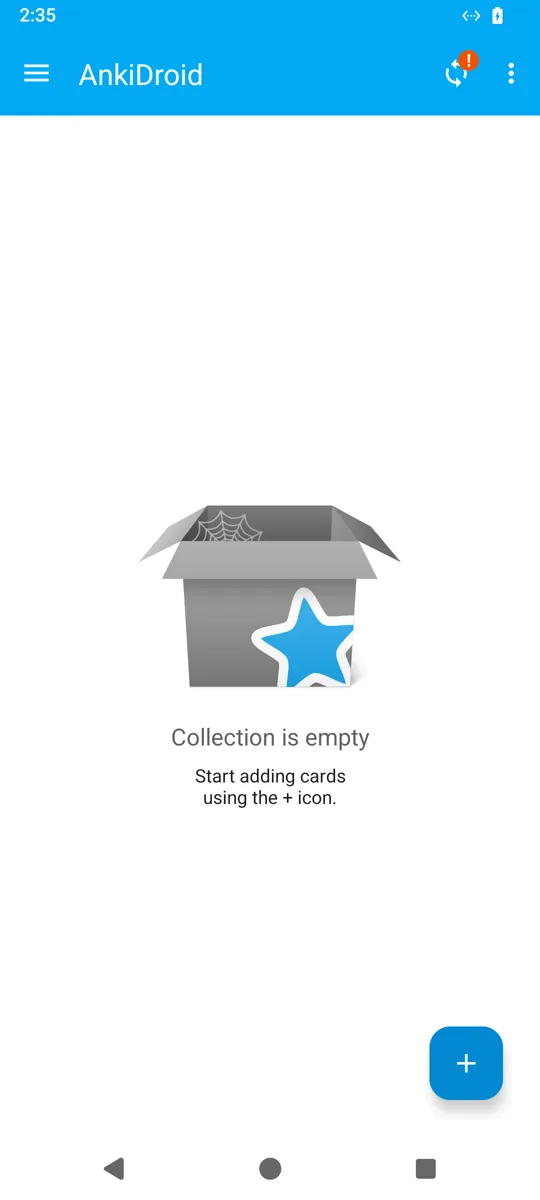
Tablet ("model": "tablet") | Phone (default) | |
|---|---|---|
| Screen | 1600×2560 at 320 dpi | 1080×2400 at 420 dpi |
| Smallest width | 800 dp, xlarge | 411 dp |
| AnkiDroid’s toolbar | Sync, Custom study, More | Sync, More |
| System bar | Android’s tablet taskbar: app icons and navigation | Three-button navigation bar |
| Memory in use | 1,015 MiB | 898 MiB |
| Create to ready | 22.9 s, boots fresh | about 1.4 s, pre-booted |
| Price | $0.01 a minute | $0.01 a minute |
Custom study is in AnkiDroid’s tablet layout only. An agent that learned the app on a phone and looks for it in the More menu won’t find it there on a tablet, which is the kind of difference worth a test.
Create a tablet, or switch a phone
curl -sS -X POST "https://mobilebox.dev/v1/phones?wait=ready" -H "Authorization: Bearer $MOBILESANDBOX_API_KEY" \
  -H 'content-type: application/json' -d '{"model":"tablet","name":"tablet-check"}'
Over MCP the agent calls create_phone with {"model": "tablet"}. To switch a running phone, set_device with {"phone_id": "…", "model": "tablet"}, or PATCH /v1/phones/{id}/device with {"model":"tablet"}: the phone restarts once, in 14 s when we measured it, in the same session, and its installed apps, data and logins stay. "model": "phone" switches it back.
GET /v1/phones/{id}/device answers form_factor: "tablet" and the screen size. Screenshots, the coordinates in observe and taps all use the tablet’s pixels, so an agent’s coordinate taps from a phone run don’t carry over; targets by text or ref do.
A test your agent can run
- Create one phone and one tablet, and install the same build on both with
install_app. - On each,
observethe main screen and list the elements. Anything on one and missing on the other is either a tablet layout working as designed or a bug. - Walk the same flow on both by text targets, not coordinates.
- Take a
screenshotof each for a person to compare, and look at the bottom of the tablet screen: the taskbar takes space a phone’s bar doesn’t. - Delete both phones.
The run costs two phone-minutes for each minute it takes, so a five-minute check is $0.10.
What to know
- A tablet boots fresh instead of coming from the pre-booted pool, so its create takes about 20 s. Switching a running phone takes about 15 s.
- It is a tablet’s screen and configuration on the same Android 14 phone: no stylus, no keyboard cover, no hinge. For a bug that needs one specific tablet model’s hardware, use a physical tablet; Mobilebox has none (real devices or cloud phones).
- iPad is a separate model of the iOS simulator:
{"platform":"ios","model":"ipad"}, see iOS. - Every field is in the API reference.